Review Process: Frequently Asked Questions.
This page answers the following questions:
What is the PHOM review process?
How do I access a paper I need to review?
What are the components of a review?
How do I submit my review?
Can I edit my review after submitting it?
What do I have to review?
You need to fill in the assessment grid for each paper and make relevant constructive comments if you deem it appropriate.
Also, you need to write a:
-
-
- a recommendation for the conference committee
- A short, constructive comment for the authors to help them move their project to the next phase.
All reviews are anonymised.
The review period starts now and runs until March 9th. Until this date, you may edit your reviews at any time.
How do I access a paper I need to review?
If you are assigned as a reviewer, you will have access to one or more papers to review.
To access your assigned papers:
1. Go to Reviewing -> New submissions. You will see a list of papers assigned to you.
2. Click on the small pencil icon to the right of each title; see image below:
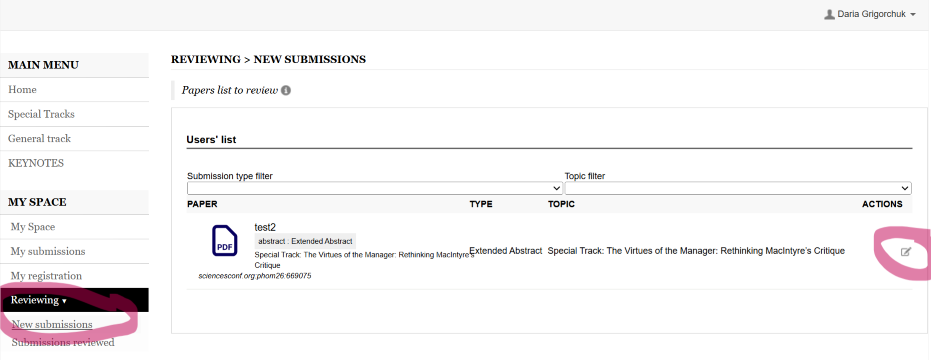
A new window will open, where you can download and read the paper, view the evaluation criteria and enter your comments.
What are the components of a review?
Each review consists of the following components:
1. Evaluation criteria.
Evaluation is based on six criteria, all weighted equally. Each criterion is scored on a predefined scale from 1 to 3. The criteria are the following :
Importance/Significance of the topic; Interest / Conference fit; Originality / Novelty; Philosophical contribution & argument potential; Theories / Concepts mobilized (rigor & pertinence); Feasibility & development into a full paper.
2. Internal comment.
This comment is only visible to the conference coordinator and will not be shared with the author.
3. Comment for contributor.
This section contains feedback that will be shared with the author.
4. Topic Suggestion (Optional).
If you believe the paper would be better suited to a different conference track, you may suggest an alternative topic here. This suggestion will be communicated to the author.
How do I submit my review?
Once you have completed all parts of the review, click Save to submit it. Your review will be recorded automatically once it is saved.
Can I edit my review after submitting it?
Yes, you can change your review before the end of the review period on the 9th of March.
After saving your review, it will appear under Reviewing -> Submissions reviewed. You can reopen it from this section and make changes until the review period ends.
 Loading...